RAHWE Website & Shop · Customers & sales
Your website and shop, ready this afternoon.
Without it
Sound familiar?
Orders arrive in direct messages and get lost.
A separate online store means typing every product twice.
Customers ask "where is my order?" all day.
What you get
Everything in Website & Shop
Ready-made designs
Templates for boutiques, cafés and bakeries, salons, electronics, grocery, home services, restaurants and perfume and gift shops. Change colours, words and photos.
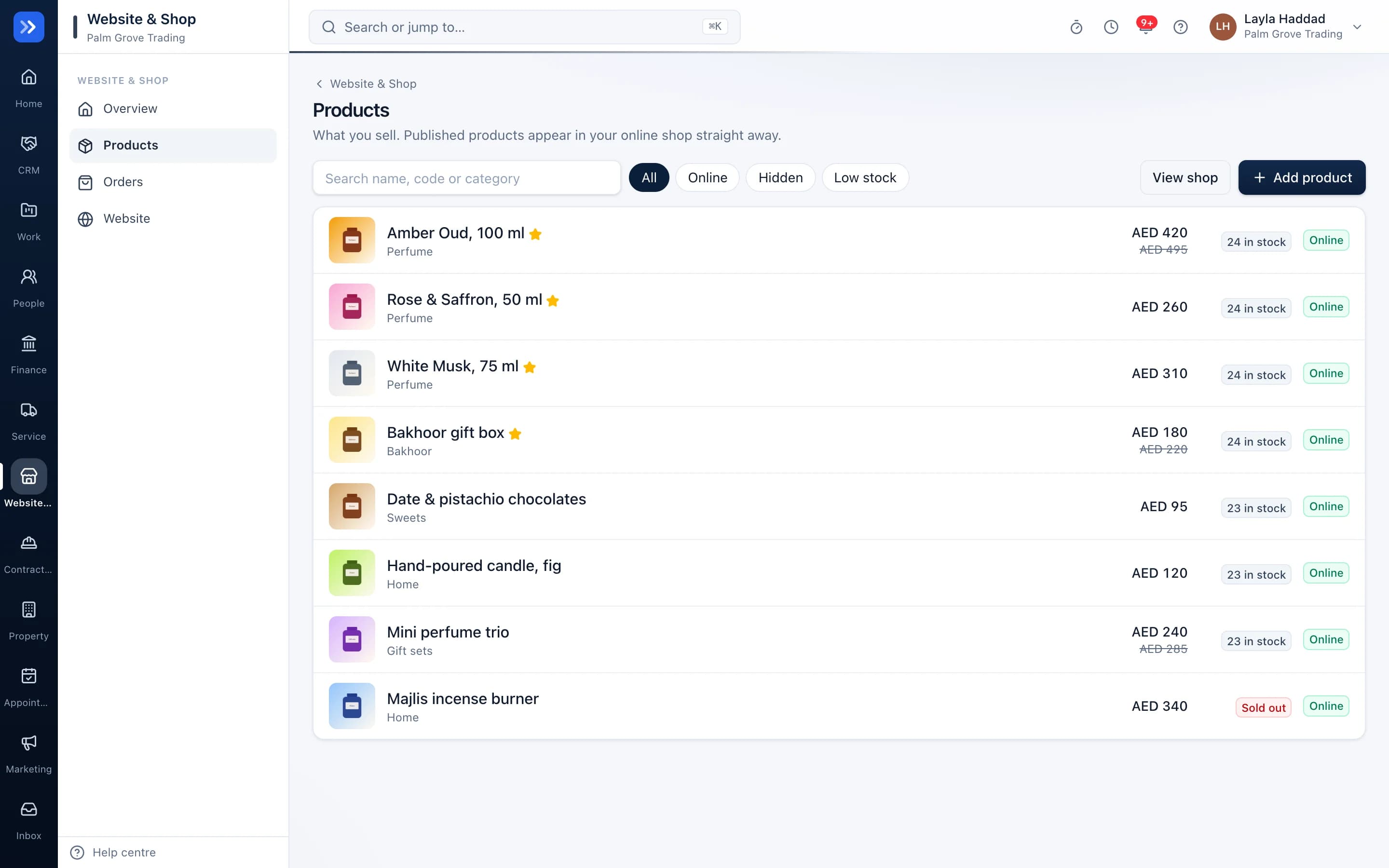
Products with photos and stock
Prices, sale prices, options such as size, categories and stock levels. Photos are resized and cleaned automatically.
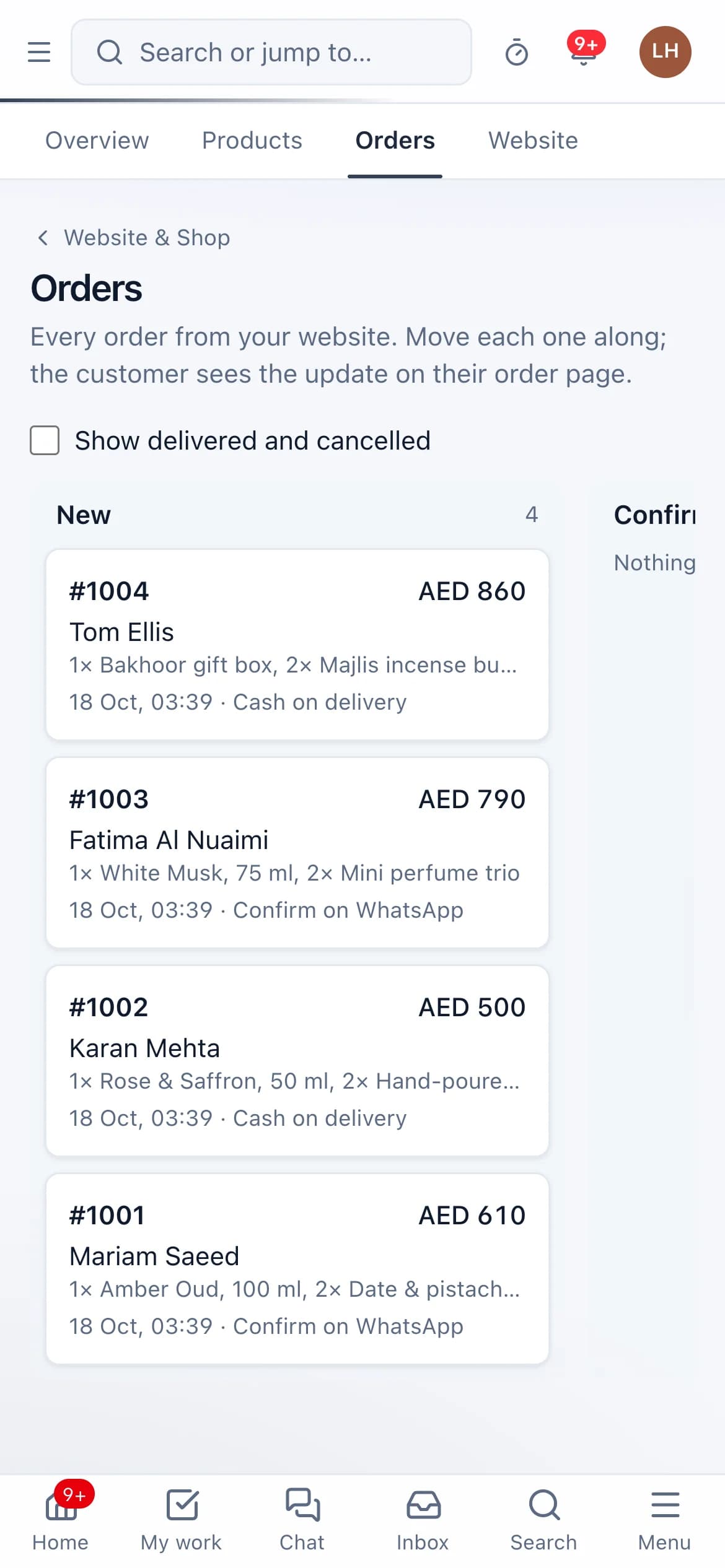
Orders that track themselves
New, confirmed, packed, out for delivery, delivered. The customer gets a live tracking link.
Ways to pay
Cash on delivery, pay on WhatsApp, bank transfer or pay in store.
Arabic or English
Your shop can run in Arabic, right to left, or in English.
Found on search engines
Every product page is set up for search engines with structured data and a sitemap.
Search that understands
Customers can search your shop by what they mean, such as "gift for mum", not only exact product names.
Low-stock alerts
You are told when a product is down to its last 3, and again after it is restocked.
Buyers become customers
Every order adds the buyer to your customer list so you can invite them back.
In action
Watch Website & Shop at work
A real screen recording with a sample company.
How to use it
Up and running in 5 steps
The screen names match what you see in the app.
- 1
Choose a design
Website & Shop → Website
Pick the template closest to your business and set your colours, words, contact details and opening hours.
- 2
Add your products
Website & Shop → Products
Add a name, price, photos, options such as size, and the stock you have.
- 3
Set delivery and payment
Website → Shop settings
Set a delivery fee, a free-delivery amount and the ways customers can pay.
- 4
Publish
Website
Your site goes live on your own address. Share the link or print the QR poster for your counter.
- 5
Handle orders
Website & Shop → Orders
Confirm, pack and mark out for delivery. The customer follows along on their tracking link.
Who uses it
Made for the people doing the work
Shops and boutiques
Sell online without a second system.
Cafés and bakeries
Take pick-up and delivery orders.
Home-based sellers
Move orders out of direct messages.
How it flows
One step leads to the next
- 1Pick a design
- 2Add products
- 3Publish
- 4Customer orders
- 5Packed and delivered
- 6Buyer saved as a customer
Works with
Better with the rest
Turn these on and they share the same customers, staff and records. Leave them off and Website & Shop still works on its own.
Questions
Questions about Website & Shop
Do I need my own domain?+
No. Your shop runs on your own RAHWE address, such as yourname.rahwe.tech.
Does RAHWE take a commission on orders?+
No. RAHWE takes nothing from your sales.
Can I take card payments?+
RAHWE never handles card details. You can add your payment provider's link, or use cash on delivery, bank transfer or payment on WhatsApp.
Try RAHWE Website & Shop.
Switch on Website & Shop alone or with the rest of the apps.