RAHWE Contracting · Industry editions
Price it right. Bill it right. Know your margin.
Without it
Sound familiar?
Estimates live in spreadsheets with hidden formula mistakes.
Progress bills and retention are worked out by hand.
Nobody knows a project's real margin until it is too late.
What you get
Everything in Contracting
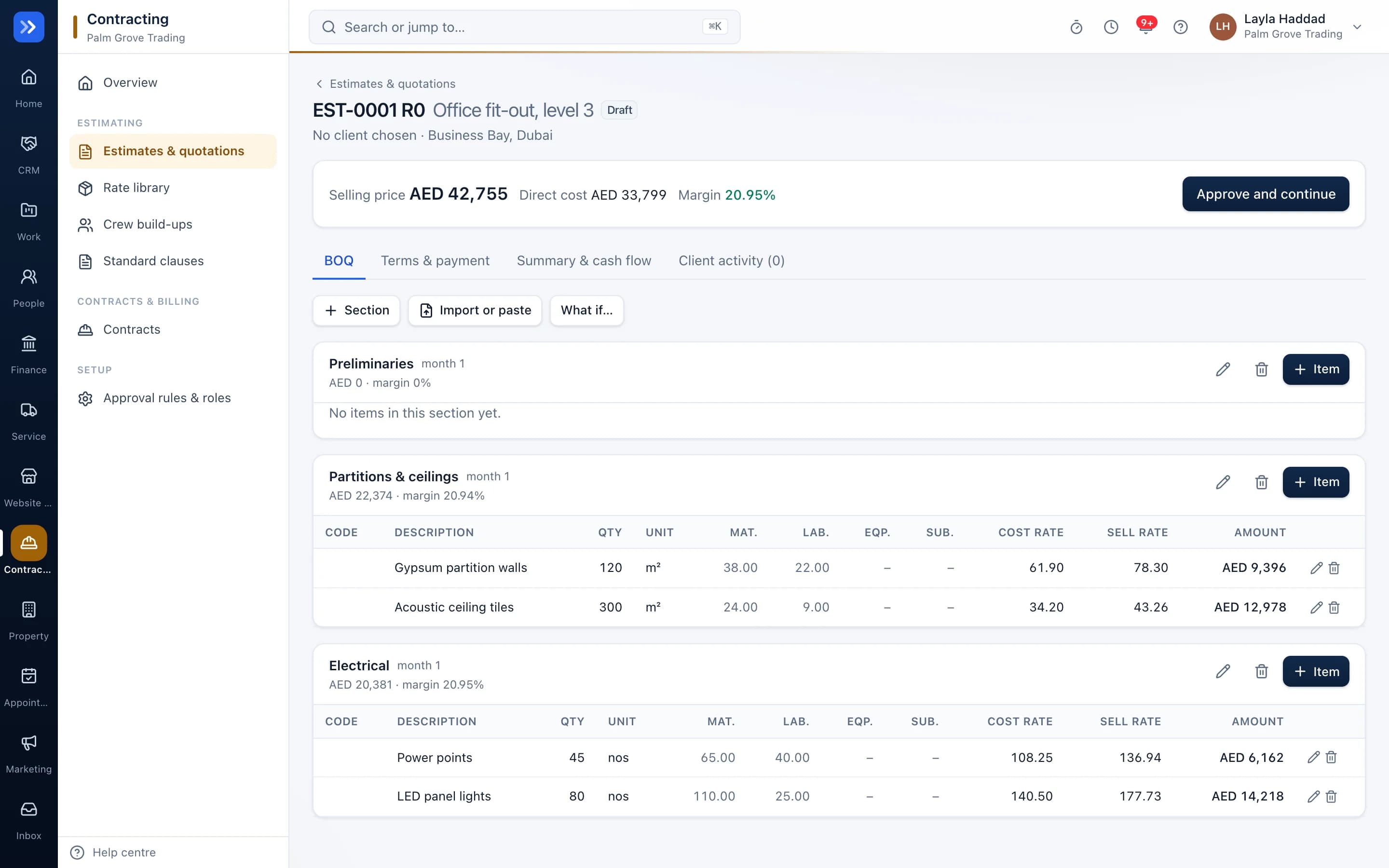
Bill of quantities
Sections and items with material, labour, equipment and subcontract rates, wastage, overhead and profit, with the selling rate worked out for you.
Rate library and crews
Reuse your standard rates and crew build-ups, such as one mason and two helpers per day.
Quotations clients accept online
A branded quotation link with your terms. Acceptance is recorded with name and time.
Progress billing with retention
Each claim works out work done, minus previous claims, retention and advance recovery, plus VAT, and posts to your books.
Project profit
Certified, invoiced and received against costs, with the forecast margin.
Approvals
Quotes below your minimum margin need a manager's approval.
Standard clauses
Keep your assumptions and exclusions as reusable clauses.
In action
Watch Contracting at work
A real screen recording with a sample company.
How to use it
Up and running in 5 steps
The screen names match what you see in the app.
- 1
Set up your rates
Contracting → Rate library, Crews
Save your standard material and labour rates and crew build-ups once.
- 2
Build the estimate
Contracting → Estimates
Add sections and items with quantities. RAHWE works out cost, margin and the selling price.
- 3
Send the quotation
Estimate → Quotation
Share the branded link. The client accepts online and the contract value is set.
- 4
Bill progress
Contracting → Contracts
Each month record work done. Retention, advance recovery and VAT are worked out and the invoice posts to your books.
- 5
Watch the margin
Contract → Profit
Certified, invoiced, received and costs, with the forecast margin.
Who uses it
Made for the people doing the work
Fit-out and interiors
Quote fast and bill progress accurately.
MEP and civil contractors
Control retention and margins.
Maintenance companies
Price jobs from a rate library.
How it flows
One step leads to the next
- 1Bill of quantities
- 2Quotation
- 3Client accepts
- 4Monthly progress claim
- 5Retention held
- 6Retention released
Works with
Better with the rest
Turn these on and they share the same customers, staff and records. Leave them off and Contracting still works on its own.
Questions
Questions about Contracting
Can I import my bill of quantities from Excel?+
Yes. Paste or import a spreadsheet and map the columns.
How is retention handled?+
Retention is held on each claim up to your cap and released in two parts, at handover and after the defects period.
Is Contracting switched on by default?+
No. Switch it on under Apps, or choose the Contracting business type when you sign up.
Try RAHWE Contracting.
Switch on Contracting alone or with the rest of the apps.